

The AI landscape is evolving rapidly. Many professionals now use more than one AI model because each excels at different tasks. One model might be better at coding, another at writing, and another at research or brainstorming.
The challenge? Managing multiple AI subscriptions, browser tabs, and conversations can quickly become overwhelming.
That's why multi-AI platforms have become increasingly popular. They allow users to access multiple leading AI models from a single interface, making it easier to compare responses, organize conversations, and work more efficiently.
If you're looking for a platform that brings your favorite AI assistants together, this guide compares ChatGrid with other popular multi-AI solutions to help you choose the right one.
Why use a multi-AI platform?
Using several AI tools individually often means:
- Switching between browser tabs
- Logging into multiple accounts
- Losing track of conversations
- Comparing responses manually
- Managing several subscriptions
A multi-AI workspace simplifies this experience by giving you one place to interact with multiple models.
This can save time, improve productivity, and make it easier to choose the best AI for each task.
ChatGrid at a glance
ChatGrid is designed to simplify how users work with AI by bringing multiple leading models into one organized workspace.
Instead of jumping between separate websites, users can manage conversations from a single interface, making it easier to compare outputs and maintain productivity.
Whether you're writing content, brainstorming ideas, conducting research, or generating code, ChatGrid helps streamline your workflow.
ChatGrid vs Poe
Poe is one of the most well-known AI aggregation platforms, offering access to a wide range of AI models through a single application.
Poe Strengths
- Large library of AI models
- Mobile-friendly
- Community-created bots
- Easy to get started
ChatGrid advantages
ChatGrid focuses on creating a cleaner workspace for users who want to organize conversations and compare AI outputs without unnecessary complexity.
Professionals who regularly use AI for work may appreciate a more structured interface that keeps productivity front and center.
ChatGrid vs You.com
You.com combines AI chat with search, productivity tools, and web browsing.
You.com strengths
- AI-powered search
- Internet results integrated into conversations
- Productivity apps
- Research-focused
ChatGrid advantages
If your primary goal is managing conversations across multiple AI models, ChatGrid offers a more focused experience without mixing AI chats with search results.
This makes it easier to keep discussions organized and compare responses from different models.
ChatGrid vs Merlin AI
Merlin AI is designed as an AI assistant that works across websites through browser extensions.
Merlin AI Strengths
- Browser integration
- Summarizes web pages
- Works inside Google Search
- Supports multiple AI models
ChatGrid Advantages
Rather than acting as a browser extension, ChatGrid provides a dedicated workspace where conversations remain organized and easier to revisit over time.
For users who spend much of their day collaborating with AI, a centralized workspace can improve efficiency.
ChatGrid vs TypingMind
TypingMind has become popular among users who want a polished interface for accessing multiple AI APIs.
TypingMind strengths
- Highly customizable
- Fast interface
- Supports many AI providers
- Power-user features
ChatGrid advantages
ChatGrid is designed for users who want a straightforward experience without spending time configuring advanced settings.
Its emphasis is on helping users work productively rather than managing technical configurations.
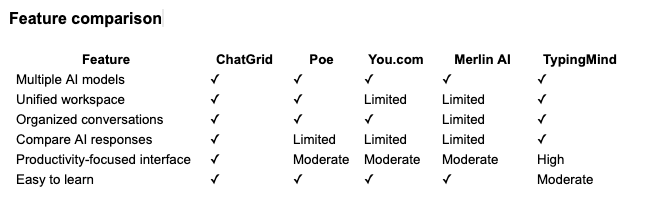
Features may change over time. Always check the latest product documentation before making a purchasing decision.
Who should choose chatGrid?
ChatGrid is well suited for:
Content creators
Generate blog posts, social media content, marketing copy, and ideas while comparing responses from multiple AI models.
Developers
Test code across different AI models without constantly switching between platforms.
Marketing teams
Brainstorm campaigns, create copy, summarize research, and compare outputs from different AI assistants.
Students and researchers
Organize research conversations and compare explanations from multiple models in one place.
Business professionals
Draft emails, prepare presentations, summarize meetings, and collaborate with AI more efficiently.
Why a unified AI workspace matters
As AI becomes part of everyday work, productivity isn't just about having access to the latest model. it's about managing your workflow effectively.

A unified workspace offers several advantages:
- Less time switching between apps
- Better organization of conversations
- Easier comparison of AI responses
- Improved productivity
- A cleaner, more focused experience
For users who rely on AI throughout the day, these small improvements can add up to significant time savings.
Final thoughts
Choosing the right multi-AI platform depends on how you work.
If you're looking for extensive customization, community-built bots, or integrated search, there are several capable options available. However, if your priority is a streamlined workspace where you can access multiple AI models, keep conversations organized, and compare responses efficiently, ChatGrid is a compelling choice.
As more professionals adopt multiple AI models for different tasks, having a centralized platform becomes less of a convenience and more of a productivity advantage. ChatGrid is built to help you make the most of today's AI ecosystem, without the clutter of managing multiple apps and browser tabs.
Top 10 reasons to use ChatGrid for AI productivity
Discover the top 10 reasons professionals choose ChatGrid to access multiple AI models, compare responses, stay organized, and boost productivity.
Why ChatGrid is the smartest way to use multiple AI models
Stop switching between AI apps. ChatGrid lets you compare ChatGPT, Claude, Gemini, and more in one workspace to save time, stay organized, and work smarter.