

Artificial intelligence has changed the way we work. From writing blog posts and generating code to analyzing data and brainstorming ideas, AI has become an everyday productivity tool.
But there's one challenge many users face: managing multiple AI platforms.
You might use ChatGPT for writing, Claude for long-form analysis, Gemini for research, and another model for coding. Before you know it, you're juggling browser tabs, copying prompts, and trying to remember which AI gave the best answer.
That's exactly why ChatGrid exists.
Instead of switching between multiple AI apps, ChatGrid gives you one centralized workspace where you can access, compare, and organize multiple AI models. All from a single interface.
Here are the top 10 reasons professionals are making ChatGrid their AI workspace of choice.
1. Access multiple AI models in one place
Different AI models have different strengths. Some are better at:
- Creative writing
- Programming
- Research
- Brainstorming
- Data analysis
- Summarization
Instead of opening several websites, ChatGrid lets you work with multiple leading AI models from one dashboard.
The result? Less switching and more productivity.
2. Compare AI responses side by side
Ever wondered which AI gives the best answer? Instead of asking each AI separately and manually comparing responses, ChatGrid lets you evaluate multiple answers side by side.
This helps you:
- Spot inaccuracies
- Find better ideas
- Compare writing styles
- Make more informed decisions
When the quality of your work matters, having multiple perspectives is a huge advantage.
3. Save hours every week
Repeatedly copying and pasting prompts between AI tools may seem insignificant, but those minutes quickly add up.
With ChatGrid you can:
- Write one prompt
- Send it to multiple AI models
- Review responses in one place
Small workflow improvements can save hours every month.
4. Keep your AI conversations organized
Finding an old AI conversation shouldn't feel like searching for a needle in a haystack.
ChatGrid helps organize your conversations so you can:
- Return to previous work
- Search past chats
- Continue ongoing projects
- Build a searchable knowledge base
Instead of scattered conversations across different platforms, everything stays together.
5. Work smarter, not harder
Every AI has strengths.
Instead of forcing one model to do everything, ChatGrid allows you to choose the best response for the task at hand.
Whether you're:
- Writing marketing copy
- Debugging code
- Summarizing research
- Planning projects
You'll always have multiple expert opinions available.
6. Boost your productivity
AI should reduce your workload. Not increase it.
By removing unnecessary steps like opening multiple tabs or repeating prompts, ChatGrid creates a smoother workflow that lets you focus on producing great work instead of managing tools.
The less time you spend navigating apps, the more time you spend creating value.
7. Perfect for teams and professionals
ChatGrid isn't just for AI enthusiasts. It's designed for professionals who use AI every day.
Popular users include:
- Marketing teams
- Developers
- Agencies
- Content creators
- Consultants
- Researchers
- Students
- Entrepreneurs
No matter your profession, having multiple AI models in one workspace makes collaboration and decision-making easier.
8. Future-proof your AI workflow
The AI landscape changes almost every month.
New models appear.
Existing models improve.
Features evolve rapidly.
Instead of constantly adapting to new interfaces, ChatGrid gives you one consistent workspace where you can continue working as AI technology advances.
It's a smarter long-term way to work with AI.
9. Reduce information overload
Managing multiple AI subscriptions and chat histories can become overwhelming.ChatGrid simplifies everything by centralizing your AI workflow.
Rather than remembering:
- Which AI answered which question
- Which browser tab is open
- Where your previous conversation is stored
You have one organized workspace that keeps everything together.
10. Get more value from AI
Most professionals don't need more AI. They need a better way to use AI. ChatGrid helps you:
- Compare responses
- Stay organized
- Save time
- Improve decision-making
- Maximize every prompt
Instead of relying on a single AI model, you can leverage the strengths of multiple models to produce better outcomes.
Why professionals are switching to chatGrid
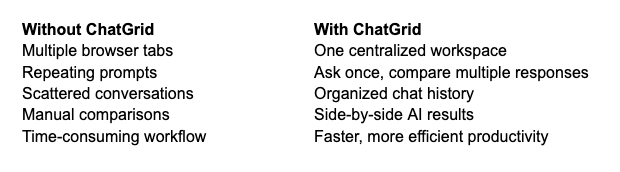
Who should use ChatGrid?
ChatGrid is ideal for anyone who regularly works with AI, including:
- Writers and bloggers
- Software developers
- Marketing professionals
- Designers
- Students
- Researchers
- Startup founders
- Business owners
- AI power users

If you're using more than one AI tool, ChatGrid can dramatically simplify your workflow.
Final thoughts
The future of AI isn't about choosing a single "best" model. It's about using the right model for the right task.
ChatGrid makes that easy by bringing multiple leading AI models into one intuitive workspace. Instead of wasting time switching between apps, repeating prompts, and searching through scattered conversations, you can focus on what really matters: producing better work.
Whether you're writing, coding, researching, or brainstorming, ChatGrid helps you unlock the full potential of AI with a faster, more organized, and more productive workflow.
Ready to transform the way you work with AI? Try ChatGrid today and discover why more professionals are choosing a smarter way to collaborate with multiple AI models.
How ChatGrid helps you get better results from AI
Unlock the full potential of AI with ChatGrid. Compare multiple AI models, organize chats, and boost productivity—all from one powerful workspace.
ChatGrid vs Other multi-AI platforms: Which one Is right for you?
Compare ChatGrid with other multi-AI platforms. Discover which AI workspace offers the best experience for managing ChatGPT, Claude, Gemini, and more.